The Library
One home for everything the company knows and owns — eight tabs in three groups (what you provide, what your team produced, your brand) with one search box across all of them.
Knowledge
Add documents — paste text, or attach a file: plain text, Markdown, CSV, PDF, Word, Excel, PowerPoint, OpenDocument, EPUB, RTF or an image, up to 10 MB. The text is read out for you — locally where the file carries it; a scanned page falls back to OCR, which can use credits — and lands in the editor to review before you Add to knowledge base. Policies, product sheets, FAQs, price lists: employees search them for facts while they work.
Test retrieval shows what they would find for a question. Download all exports the whole knowledge base as a zip of Markdown files.
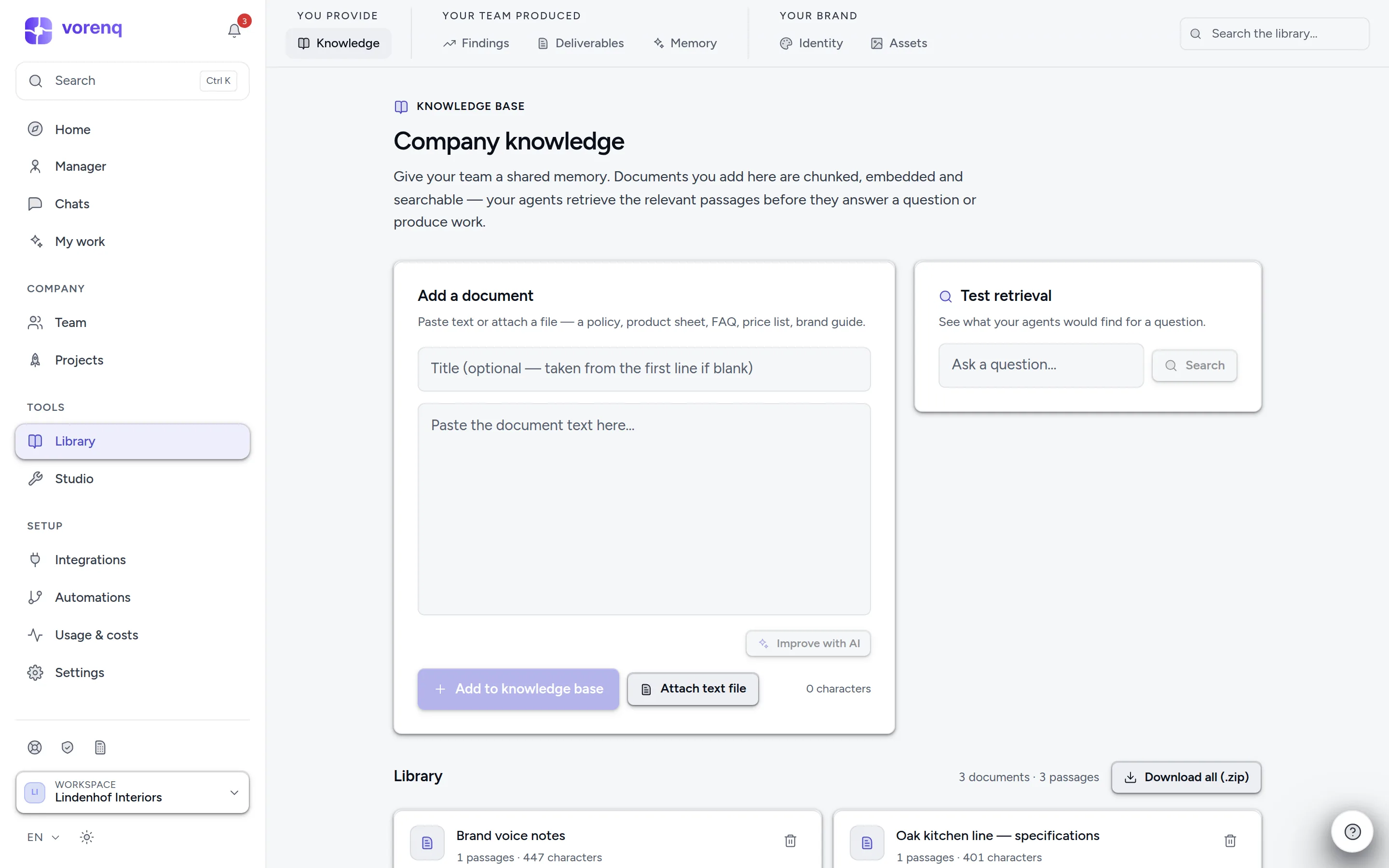
- 1The Library's tabs: what you provide, what your team produced, and your brand.
- 2Paste any text — or attach a PDF, Office file or image — and click “Add to knowledge base”. Your team uses it from then on.
- 3“Test retrieval” shows what your employees would actually find for a question.
- 4Search everything the Library holds.
Playbook
The Playbook collects how your company works: standing permissions, shared standards and decisions, employees' procedures and company context. Review lists pending decisions, expired permissions and standards due within 30 days. Owners save standards (starting from editable drafts) and grant or revoke employee permissions; members can read. A saved procedure grants no access to your tools, and reviewing or downloading a snapshot never grants permission.
Findings, Analytics, Deliverables
What your team produced:
- Findings — the metrics, figures and research findings employees gather while they work, landing here automatically: a standing record instead of scattered across old runs.
- Analytics — what they add up to: activity over time, contributors and tracked figures.
- Deliverables — every file your employees produced, searchable and filterable by who made it and its type, with Download all.
Treuhand review
Working with a Treuhänder? Treuhand review (linked from the Library's deliverables) hands a period's Finance & Accounting work to them as one packet: the files your finance employees produced, their findings, and every approval decided or still waiting. The packet is frozen when you request the review, so a sign-off covers exactly what was shown. Only the named reviewer — a signed-in member of the workspace — records corrections and the time spent, then signs off or asks for changes; that record is also how the time Vorenq saved is measured.
Memory
Durable notes distilled from finished work — what the company has learned — which employees read before taking on new work. Today's work is folded in at the end of the day (switch it off under Settings → AI & memory), or on demand with Fold today's work. Exportable and re-importable as JSON. Each employee also keeps its own memory, reached from its Team card.
Identity and Assets
Identity holds your logos, colours and brand voice & notes — employees follow them. With Brand check on, a design result is reviewed against the brand. Assets are approved marketing images employees reuse; Copy tag puts one into a brief, and Mark as used on… keeps an image from being reused on the same platform.
The company profile and its Legal identity (legal form, canton, UID, VAT method, financial year end, address) live under Settings → Company & team; Fill from the web (owners) researches them with source links for you to review, undo or save. The email signature (Settings → Email) is appended automatically, server-side, to every email your employees send from a connected mailbox — an agent can neither change nor forget it. Keep up to three, one active; with branding set, it carries your logo and brand colour.