My Work & approvals
You stay in control: sensitive actions wait for a human decision. My Work is the one place that collects everything waiting on you.
Vori's work, to-dos and proposals
My Work starts with In progress: tasks Vori and your employees are working on, their current status and decisions they are waiting for. To-do list contains the shared tasks for people in your company. Proposals are next steps prepared by Vori's team — Approve & run lets the proposing employee start, I'll do it moves it to your to-do list, Dismiss drops it. Recently finished and History show what is done.
Give Vori a task opens Vori. Adding a to-do does not hand work to Vori — Let an employee do it does (a paid run). A band at the top says how many decisions need you and how long the oldest has waited; its links open the exact decision, and Review … together takes a pile of similar ones at once. The full task board, all to-dos, all proposals and History remain available through their links. On detail pages, My work returns to the overview and More views opens the other work views. The sidebar badge counts what needs a human: approvals, questions, proposals, to-dos due today or overdue, and results that could not be verified.
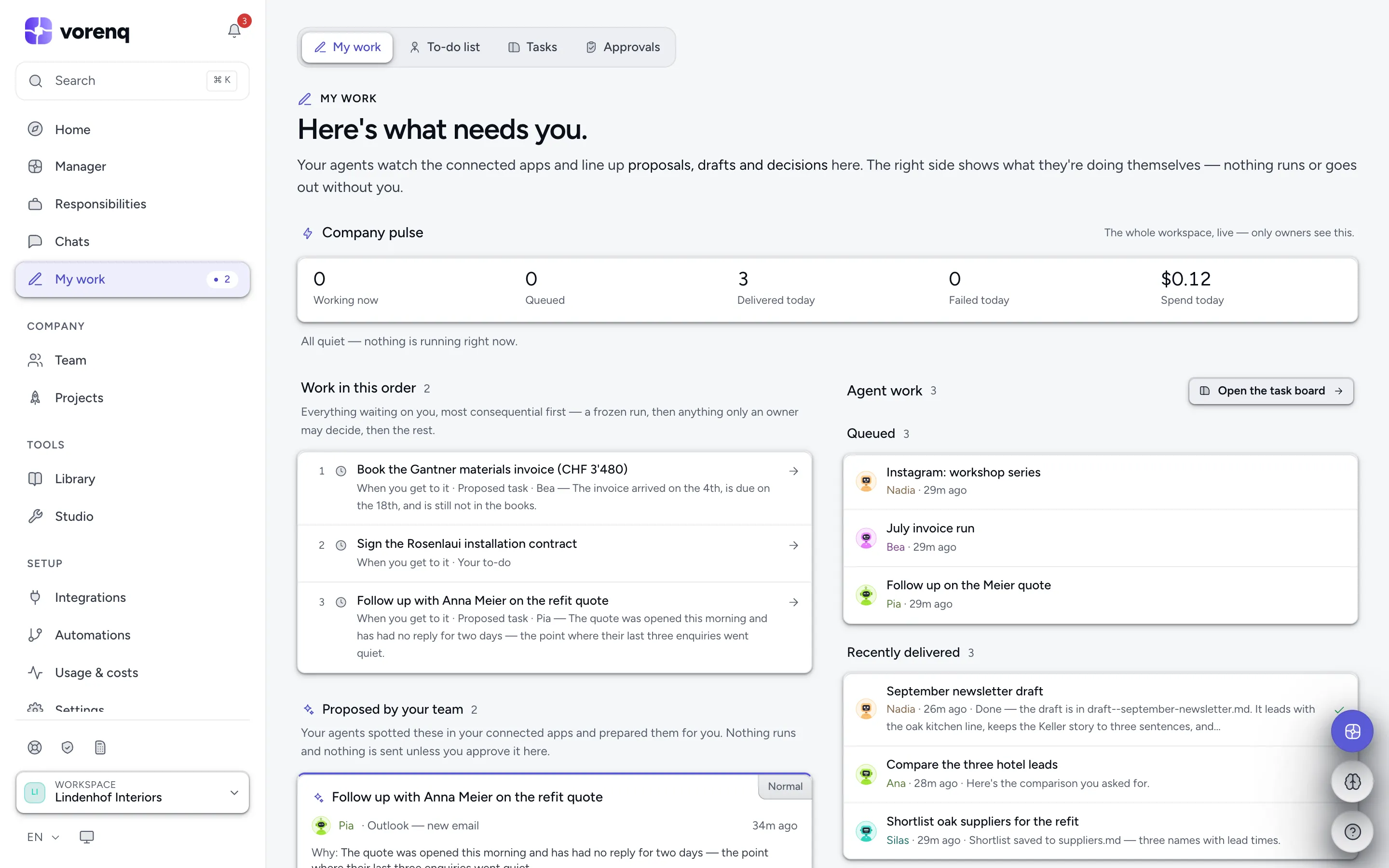
- 1“Give Vori a task” hands over new work.
- 2Jump to In progress, the to-do list, proposals or History — each with its count.
- 3Decisions waiting on you, with a link straight to the exact one.
How an approval works
When an employee reaches a sensitive or irreversible action — per your policy — it asks. The run waits for a few minutes (the approval wait, set on the Security page); after that it carries on with the rest of the work and the request stays open — a late approval is still carried out.
Decide wherever you meet it: on Approvals & questions, in the yellow band of a live run, in a 1:1 or team chat, in the follow-up chat, on the Security page, or by asking Vori. Each card offers Approve, Reject (with a reason), Request changes and, for drafted messages, Edit text. A 10-second Undo follows sends, payments, signatures and deletes.
Every approval card reminds you the action was AI-prepared: check content, amounts and recipients before approving. Approving authorises the action — responsibility stays with the approver.
Fewer, faster decisions
- Approve all similar covers this task's look-alikes in one decision (every booking step counts as similar, at any amount).
- Stop asking turns a decision into a standing rule — listed under Standing rules on the Security page and re-confirmed every 90 days.
- On the Approvals page, Approve all shown decides a filtered list, and identical questions from several employees are grouped — Send to all answers them at once.
- In the card deck, swipe right to approve, or left to give a reason and reject; Remind me puts a decision on your to-do list.
- Decision history lists past decisions and exports the audit trail as CSV.
Who may approve what
Any member can approve everyday outbound work — an email, a marketing send, a channel post, a CRM write. The actions that move money or can't be undone are owner-only: paying or moving money, writing an accounting record, requesting a legally-binding signature, deleting data, granting admin permissions.
Rejecting is never restricted — any member can stop any action, so nothing dangerous waits on one person.
Tune the rules
The approval policy is per workspace, on the Security page: which kinds of action need your approval, the single-payment cap, a recipient allow- and denylist, and the monthly run and spend caps. Per connected tool you set reading and writing separately to Default, Allow, Ask first or Block.
The approval pause is the default, and an owner can relax it — auto-approve records below an amount, monitor mode, standing rules, an employee's earned trust (Allow without asking on its scorecard), per-tool Allow. A per-tool setting never waives the safety guards (secret and personal-data leaks, deletes, untrusted web content), and in every mode, monitor included, leak blocks, the single-payment cap and a human look at irreversible deletes still hold.
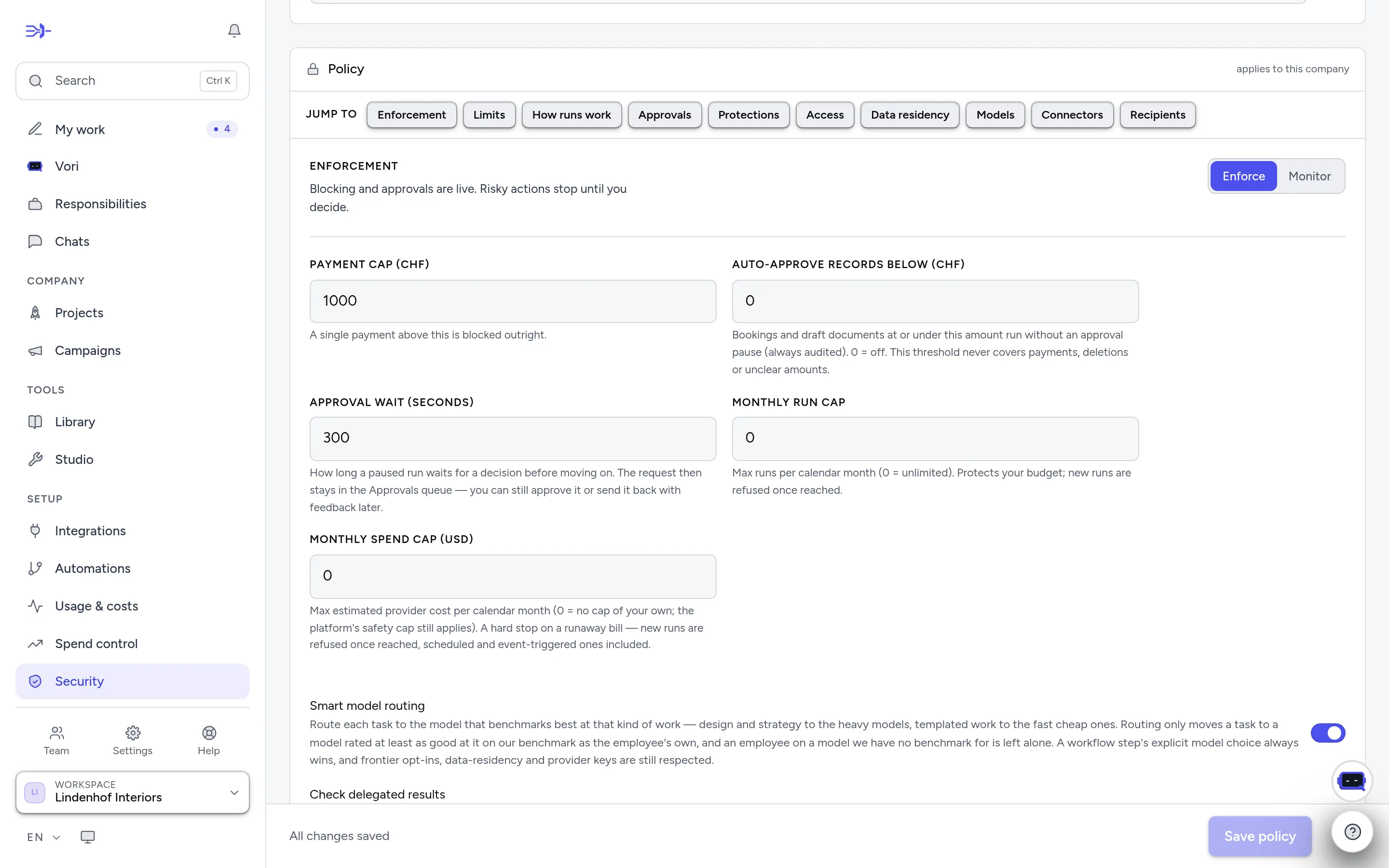
- 1“Jump to” any part of the policy — enforcement, limits, approvals, connectors, recipients…
- 2“Enforce” blocks until you decide; “Monitor” only logs what would have been asked.
- 3The limits: the single-payment cap, auto-approve below an amount, the approval wait, and the monthly run and spend caps.