Costs & credits
Usage is prepaid via credits and every run shows what it cost. When the balance is used up, work stops — unless you turned on auto-recharge. Spend control shows where the money goes, and budgets and limits stop it before a bill surprises you.
Plans & credits
Three plans per workspace per month: Solo CHF 49 with 20 credits (one use-case; the fast models and the balanced frontier class), Business CHF 149 with 75 credits (the whole firm: the same models, more employees and automations, a year of audit history), Scale CHF 349 with 200 credits (every model — buying Scale switches the frontier opt-in on — plus Ultra orchestration). 1 credit = CHF 1.
Included credits roll over for 12 months: whatever is still unused a year after it was granted expires, and the credits card shows the date beforehand; usage draws on included credits first. Purchased credits don't expire while your subscription is active; any remaining balance lapses if you cancel. Buy top-ups (5–5000) any time from the credits card on Usage & costs; an owner can turn on auto-recharge with a saved card. Manage billing (owners) opens the billing portal, where every invoice is available for your bookkeeping.
See where it goes
Every run shows its cost on the run itself. Usage & costs is your statement: what the period cost — runs plus chat, OCR and voice — spend over time, and the split by provider, by model and by employee, with a filterable run-level table and a monthly history. Failed work is never charged.
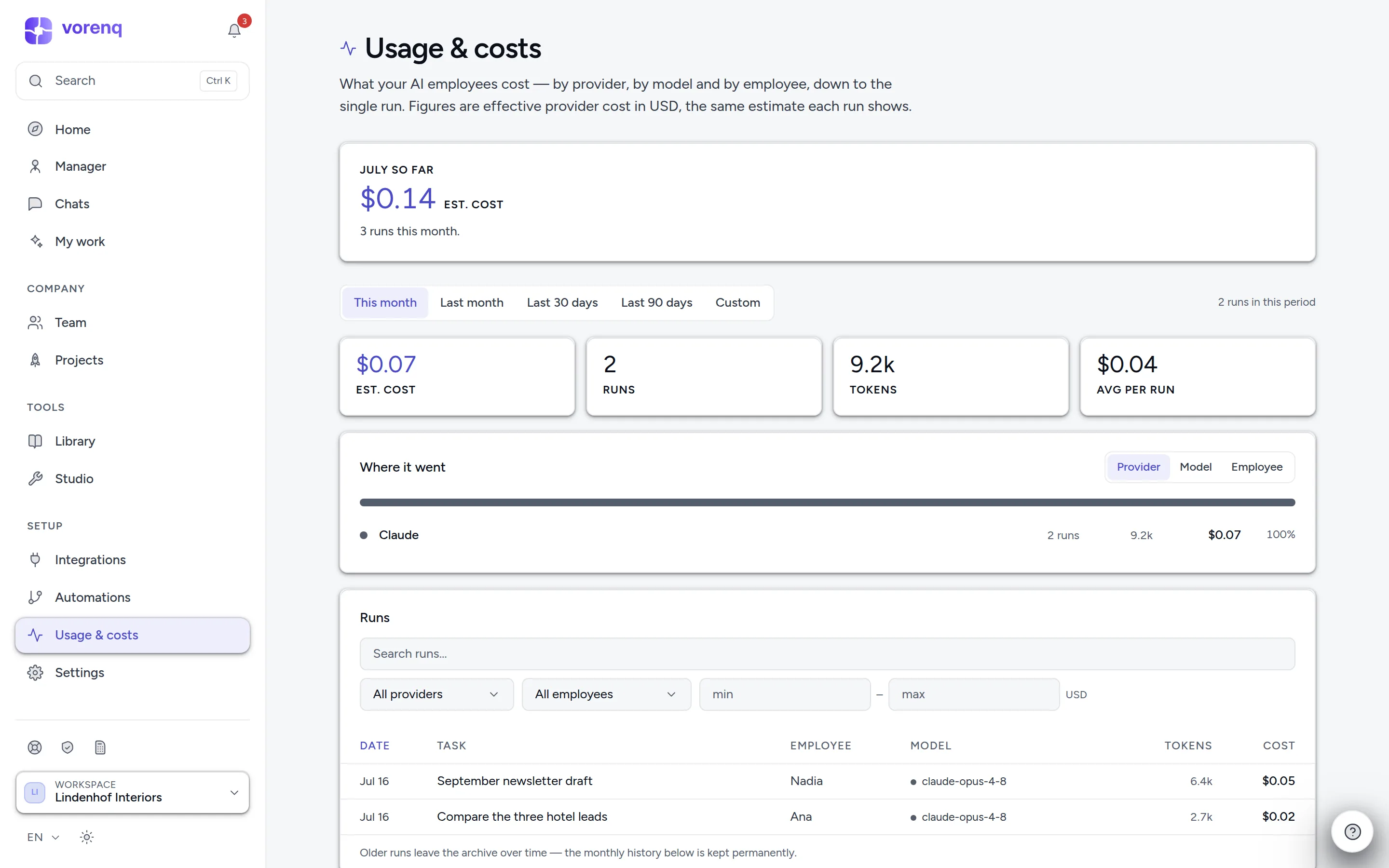
- 1Pick the period.
- 2Split the total by provider, model or employee.
- 3The month so far: every model call — runs, chat, OCR and voice — split by provider.
Spend control
Spend control is where you steer. Pick a period and group the spend by provider, model, employee, workflow, project, task type, activity or who requested it. It projects the month's end, compares with the previous period, flags unusual spend with an Investigate button, and traces any figure down to the single runs behind it.
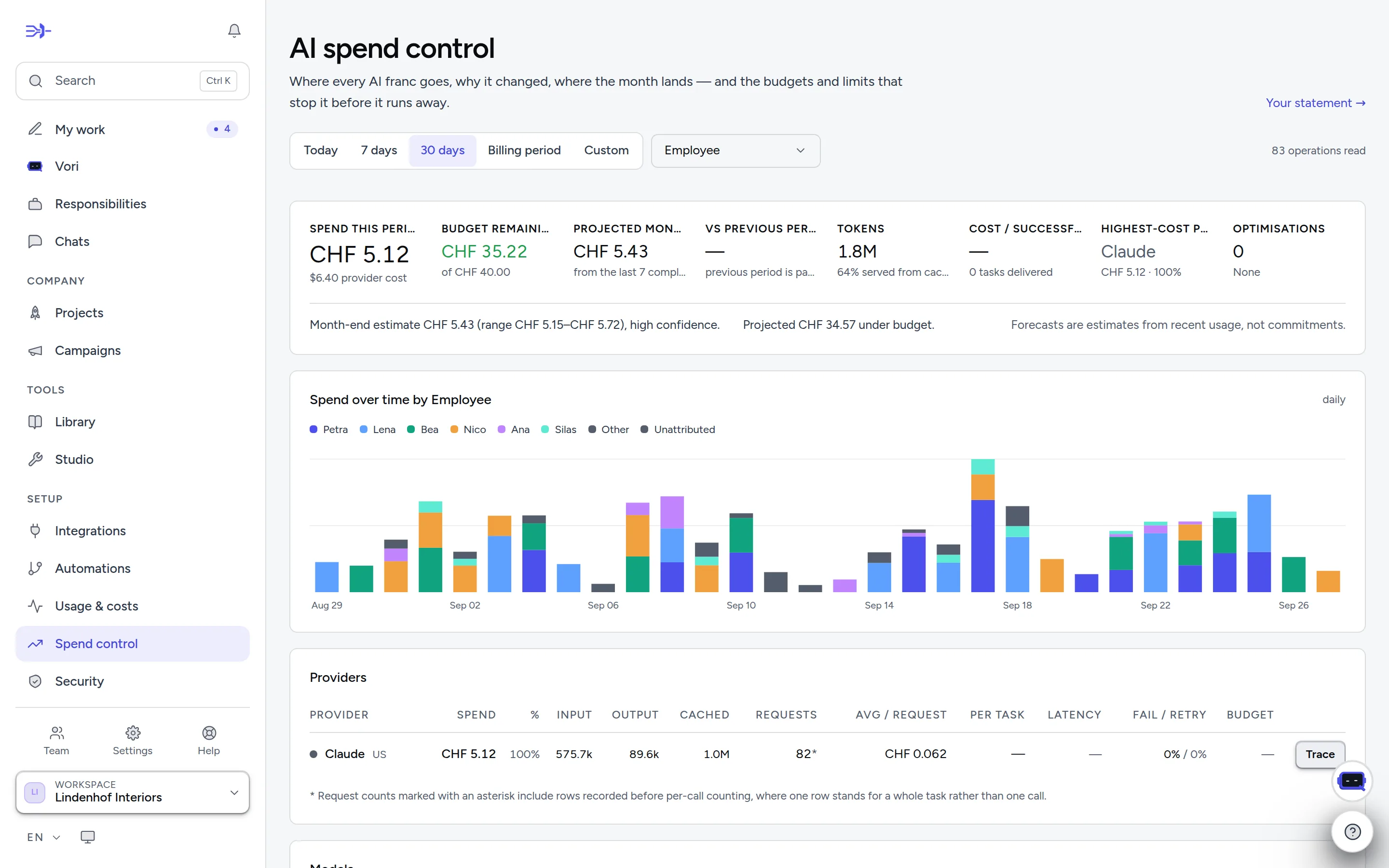
- 1Pick the period and group the spend — here by employee.
- 2Spend so far, budget remaining and where the month is heading.
- 3“Trace” follows a figure down to the single runs behind it.
Budgets and hard limits
On Spend control an owner sets budgets in CHF — for the whole workspace, a provider, a model, an employee, a workflow, a project, a department or a person — per month, day or hour. Each budget has warning steps at 50, 75, 90 and 100 % that can notify admins, warn Vori, prefer cheaper models, restrict premium ones or pause automatic work; it refuses new work only if you tick Stop work at 100 %. A department budget follows the employees in that department; a person's budget counts only the work that person starts.
Hard limits always refuse, with no warning stage: per request, per task, per workflow run, per hour, per day and per month. Budgets and limits act once Enforce is switched on.
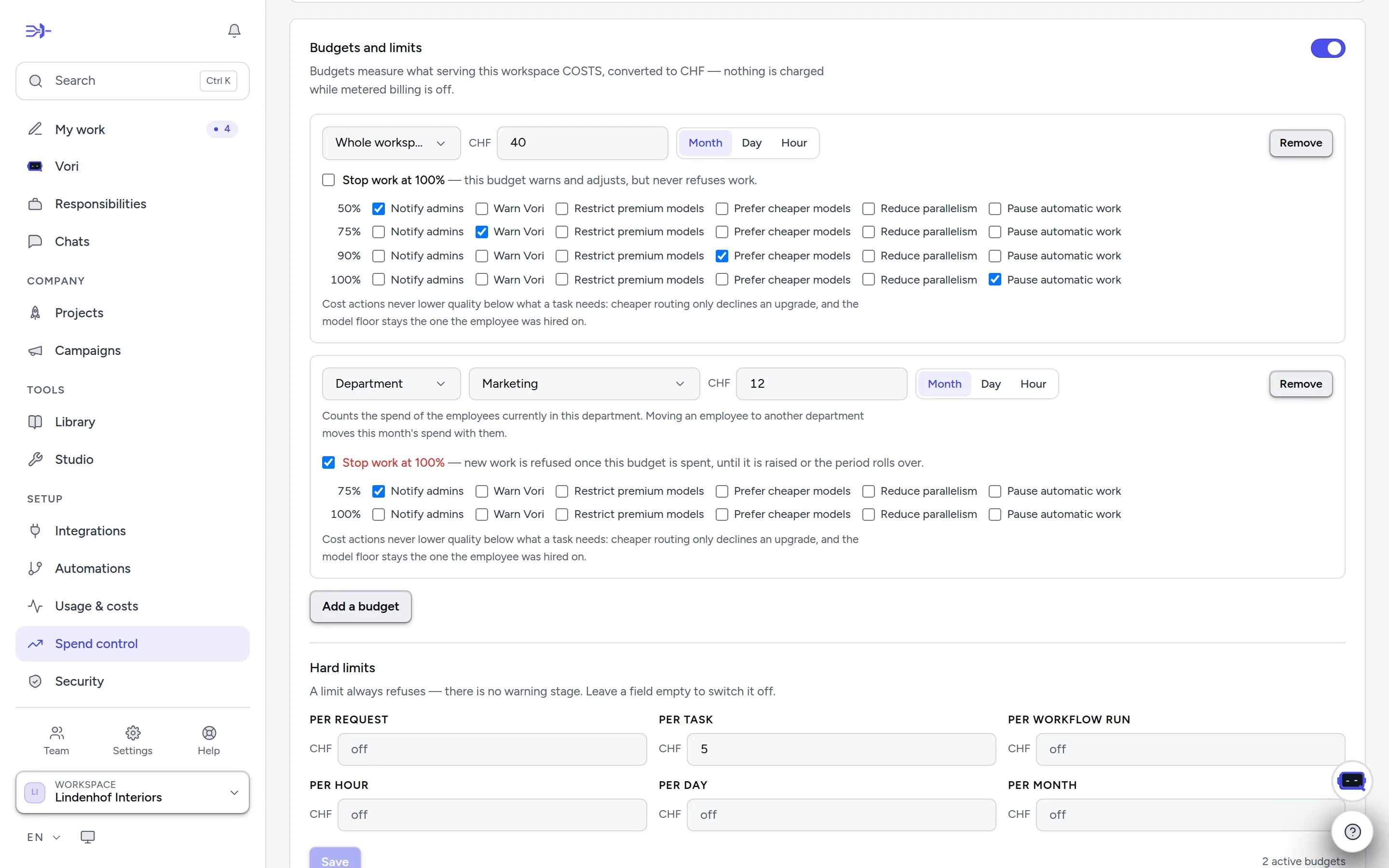
- 1“Enforce” switches budgets and limits on — off, they only show.
- 2A workspace budget with its warning steps at 50, 75, 90 and 100 %.
- 3A department budget that stops new work at 100 %.
- 4Hard limits always refuse — per request, task, workflow run, hour, day or month.
What stops work
No step or token count ends a task — money does:
- Credit balance — when it's used up, new work doesn't start and a running task halts, unless auto-recharge tops it up.
- Monthly spend cap (Security page, in US dollars — the currency AI providers bill in). If you set none, a platform safety cap still applies.
- Budgets and hard limits on Spend control.
- Per task: an accepted estimate, or the spending limit set in the composer.
A task stopped this way keeps its partial work, marked incomplete. The stop is checked while it runs, so the last step can take the balance slightly below zero. The optional monthly run cap counts runs and only refuses new ones. In the composer, Tonight −25% runs a task at the night rate, and Estimate first caps it at the figure you accept.
Models — the «brains»
Vorenq runs on the current frontier models across providers; each employee can run on a different one, and every model has an open per-token price. Smart model routing (on by default, Security page) moves a task to the model measurably best at that kind of work — never an employee whose model you pinned.
Two rules worth knowing: an employee with access to an accounting app runs on Claude Opus 5.5 and no other model, on every plan (in an EU-hosted workspace, its EU version on AWS Bedrock) — whatever is picked in its editor, and smart routing never moves it; with Opus 5.5 unavailable the run is refused rather than done on another model. The books are real money. And frontier models must be enabled per workspace on the Security page before any employee may use them. A workspace can also bring its own provider keys (Settings → AI & memory): the model cost then goes to your provider account, and credits cover only Vorenq's margin.