Hiring & tuning your team
An AI employee is a role, operating instructions, a model, tools and app access — all yours to shape. Hire ready-made specialists or design your own.
Hire from the catalog
Open Team at the foot of the sidebar. At the top of the Team page: Departments, Browse marketplace and Hire employee.
The marketplace is organised by department — Marketing, Sales, Finance & Accounting, Legal & Compliance, Engineering & Data, Research, Customer Support, Project & Operations, People & HR. Hire a ready-made specialist with one click, or Book team for a whole department. Hire employee designs one from scratch in the editor. Hiring is owner-only — and Vori can hire for you too: describe the work, approve its proposal.
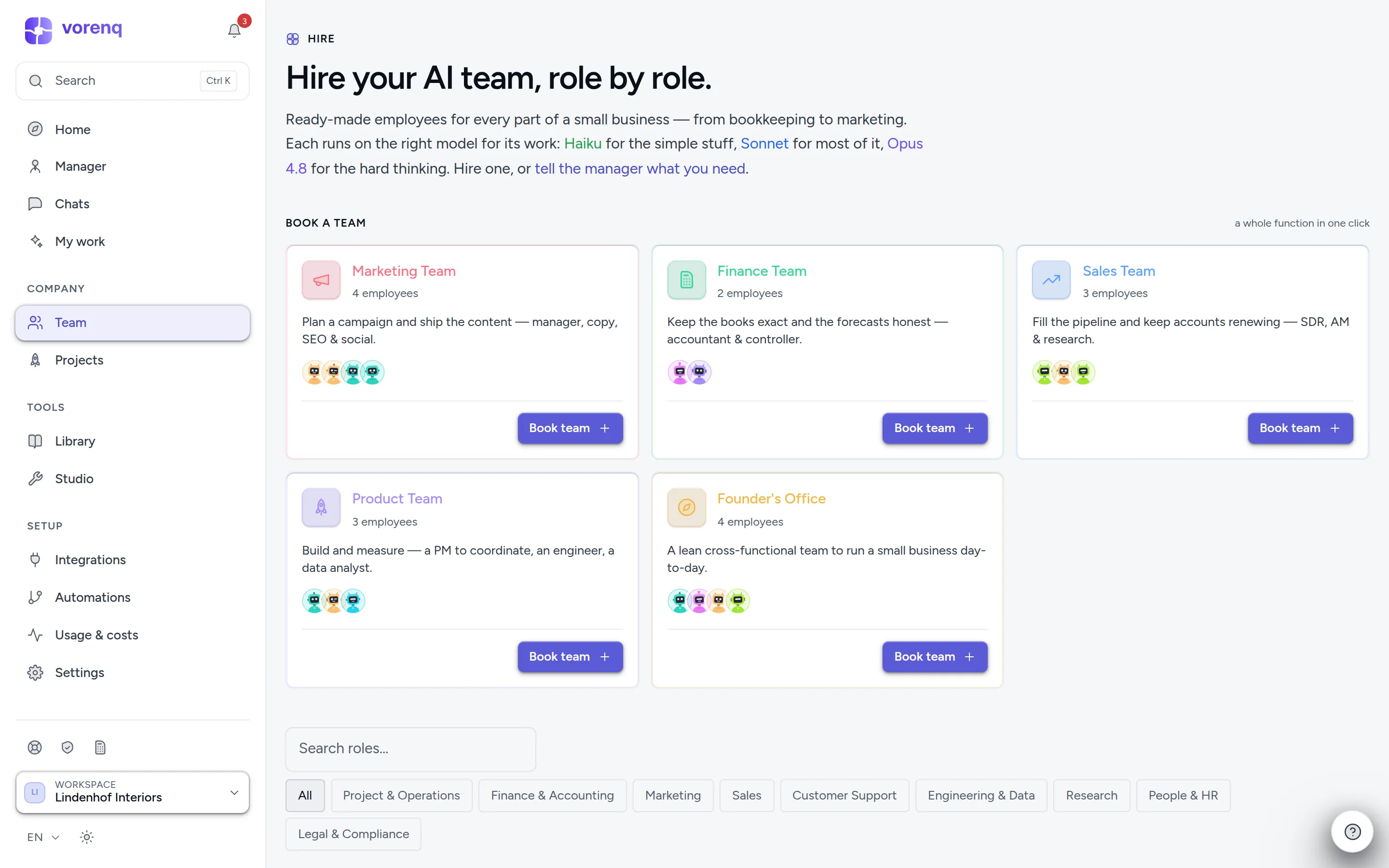
- 1“Book team” hires a whole department in one click — e.g. marketing: lead, copy, SEO, social — and opens its team chat.
- 2Need one specific skill? Search all roles here.
- 3Or browse by department — every specialist arrives pre-configured for the job.
What an employee is made of
Each employee has a role, operating instructions, a model (the «brain»), tools, and the apps it may use. Each card offers Give a task, Chat, Memory, Skills and Scorecard; Edit & rename (or a click on the name) opens the editor. There you can also pin its model, exclude it from the company inbox, hold every outgoing message for review (Send review), choose which colleagues it may contact, and restore an earlier setup from its history. Improve with AI buttons polish rough notes into finished instructions wherever you see them.
Replace (handover) passes an employee's memory, skills, teams, schedules and workflows to a successor. A new hire invites you to onboard it with a few quick questions, saved to its memory.
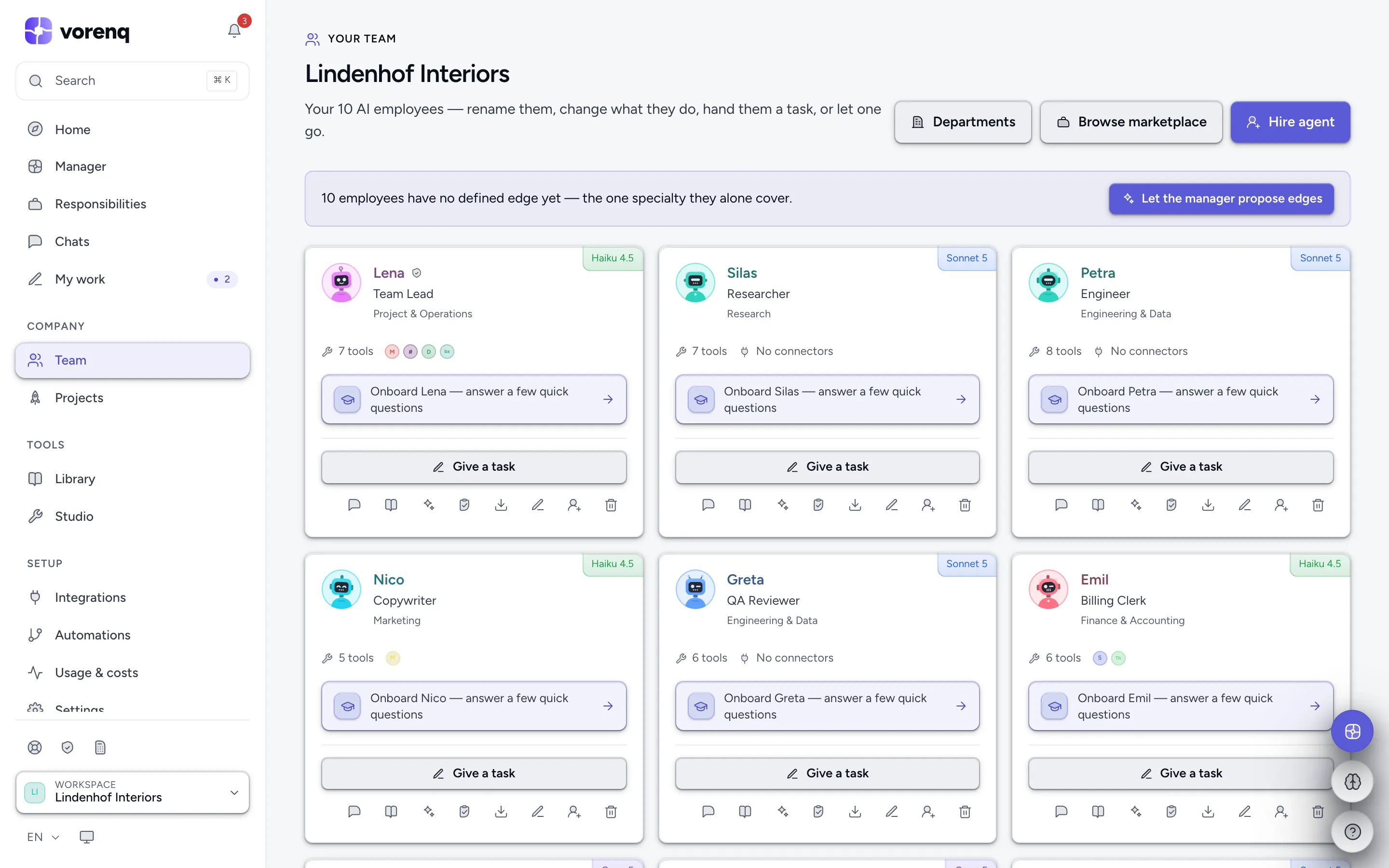
- 1One card per employee: give it a task, chat, open its memory, skills and scorecard, or edit and rename it.
- 2The chip shows the model this employee thinks with — heavier models for harder jobs.
- 3“Hire employee” designs a new employee from scratch; the marketplace is right beside it.
Pre-trained — and they keep learning
Every employee ships with built-in standard skills for its department, plus a universal floor every employee carries: honest comparisons, verify before claiming done, treating outside content as data rather than instructions, minimal use of personal data, asking one good question when a decision is yours, looking up company knowledge before stating a fact, and Swiss law as the frame — looked up and cited, not guessed.
On top, employees acquire skills while they work — reusable procedures they apply on later runs. The Skills view marks standard skills (read-only) and shows how often acquired ones are used; Copy to… gives one to colleagues, and owners can edit or remove them. Skills belong to the employee, not the tool: swap a connector for another of the same kind and the know-how carries over. Employees also carry template files for standard deliverables, so the same kind of work always arrives in a recognisable shape.
Trust is earned, per category
An employee's Scorecard tracks how its work is received. After ten clean approvals in a row in one category (rejections and rewrites reset the streak), an owner can grant Allow without asking for that category — and revoke it at any time.
Departments
Departments on the Team page opens one dashboard per department: what it is working on, a box to assign work (or start from a template), its roster, recent work and deliverables (Download all), and its open and overdue items.
Invite your colleagues
A workspace can have several human members — everyone shares the same employees, runs and credits. Invite from Settings → Company & team → Members: enter an email and choose owner or member. The invitation is emailed and the link is shown to pass on yourself; it is valid 7 days, only for that address, and works once. Pending invitations can be revoked, owners can change roles, and each member's two-factor status is shown — an owner can require two-factor for the whole workspace.
Members work: dispatch tasks, chat, review results. Owners additionally manage people, rename or delete the workspace, and make staffing changes.